RecoveryFox AI Coupon Code - June 2026

Verified by Hemant Kumar, Founder of CouponGod · Last updated: June 01, 2026
Categories
  • All
  • Deals
  • Coupons
  • Sales
RecoveryFox AI Discount Code: Extra 5% Off on all Plans
Coupon
2 months ago Verified by Hemant Kumar

Extra 5% Off on All Plans

RecoveryFox AI Discount Code: Extra 5% Off on all Plans
VIEW DEAL
SHOW CODE
Show next

What Is RecoveryFox AI — Company and Product Overview

RecoveryFox AI is data recovery software designed to retrieve lost or deleted files from various storage devices. It uses AI algorithms to restore photos, videos, documents, audio, and database files. Compatible with NTFS, exFAT, and FAT32 file systems, it works with internal drives, external HDDs and SSDs, USB drives, SD cards, and cameras. The software preserves original file structures and includes search filters to locate specific files. Users can preview recoverable content before completing the restoration process.

RecoveryFox AI is developed by WonderFox — the same company behind WonderFox HD Video Converter Factory and WonderFox DVD Ripper Pro. Built on many years of technical expertise, the software provides data recovery solutions that balance efficiency and security.

Operating in read-only mode, RecoveryFox AI maintains data integrity while protecting user privacy during the recovery process. This read-only approach is fundamental to responsible data recovery — it means the software reads your storage device without writing to it, preventing the accidental overwriting of recoverable data that can permanently destroy files during botched manual recovery attempts.

Windows-only — critical pre-purchase information: RecoveryFox AI is compatible with all brands of computers running Windows OS. Mac and Android are not yet supported. If you primarily use a Mac or need Android data recovery, this tool is not compatible; you'll need an alternative.

Free scan before purchase: The unregistered version allows you to scan and preview your data for free, so you can see what's recoverable before deciding to purchase. This is the most important step before spending any money — always run the free scan first to confirm that your specific files are recoverable from your specific device.

How RecoveryFox AI Works — The Three-Step Process

RecoveryFox AI features a three-step workflow: location selection, scanning, and recovery. The interface allows users to pause and resume scans as needed.

Step 1 — Select Location When you launch the application, your drives are displayed on the Home Page. Select the drive you want to recover by clicking it. A Quick Access option lets you instantly navigate to a specific drive, the desktop, or the recycle bin. You can also filter files by size or date modified before scanning.

Step 2 — Scan RecoveryFox AI starts scanning the selected device. You can pause or stop the scanning to preview the scan results at any point — you do not need to wait for a complete scan before previewing what has been found. The AI scan intelligently identifies and reconstructs fragmented files during this process.

Step 3 — Recover Files are restored with their original names and folder structure. Select the specific files you want to recover from the preview — or recover everything the scan identified — and choose the destination folder where the recovered files will be saved. Always save to a different drive than the one you are recovering from.

The software requires minimal input from you and does its job quietly. It blends the simplicity of an intuitive, beginner-friendly interface with AI-powered scanning and recovery algorithms.

What Data RecoveryFox AI Can Recover

RecoveryFox AI supports a wide range of file types, including photos, videos, documents, PDFs, zip files, audio, and database files. Supported storage devices include internal hard drives, external HDDs, SSDs, USB flash drives, SD cards, TF cards, and cameras. Compatible file systems include NTFS, exFAT, and FAT32.

Specific data loss scenarios RecoveryFox AI addresses:

  • Accidental deletion — files deleted normally or emptied from the Recycle Bin
  • Shift+Delete recovery — files bypassed the Recycle Bin entirely
  • Formatted drives — recovering data after accidental or intentional drive formatting
  • OS corruption — data loss caused by operating system failures or crashes
  • Ransomware damage — RecoveryFox AI can recover data in scenarios including ransomware attacks, corrupted operating systems, and accidental deletion
  • Lost partitions — recovery from inaccessible or missing partition tables

What RecoveryFox AI cannot guarantee: Data recovery is never 100% certain. The success rate depends on how much new data has been written to the storage device since the files were lost — the longer the gap between data loss and recovery attempt, and the more the device has been used in between, the lower the recovery probability. Always stop using a device immediately after data loss and attempt recovery as quickly as possible.

RecoveryFox AI Core Features — Technical Breakdown

AI-Powered Deep Scan

RecoveryFox AI's AI Scan intelligently identifies and reconstructs fragmented files. This advanced scanning technology delves deeper into storage devices, intelligently identifying and reconstructing lost file structures that conventional methods often miss. It significantly boosts the chances of recovering data from complex data loss scenarios — especially recovering formatted or permanently deleted files.

The AI component specifically addresses a key weakness of traditional signature-based scanning: fragmented files where pieces of the original data have been scattered across different sectors of a storage device. Conventional scanners often miss these or recover only partial files; the AI reconstruction attempts to reassemble the complete original.

Real-Time Preview Before Recovery

Users can preview recoverable content before completing the restoration process. This preview covers photos, documents, and video files — allowing you to confirm the recovered file is genuinely the one you need before saving. Particularly valuable when recovering from a device with thousands of files, where sorting through results manually would be time-consuming.

Selective File Restoration and Smart Filtering

RecoveryFox AI includes selective file restoration and smart filtering that allows users to find and recover specific files without sifting through irrelevant data. Filter by file type, file name, size range, or modification date to narrow down results from large scans to the specific files that matter.

Pause and Resume Scans

The interface allows users to pause and resume scans as needed. Deep scans on large drives (1TB+) can take significant time. Pause-and-resume means you can check progress, preview files found so far, and continue the scan later without losing the progress already made — a practical feature for non-technical users who cannot leave their computer running continuously.

Privacy-First Architecture

RecoveryFox AI does not collect your data. Operating in read-only mode, the program maintains data integrity while protecting user privacy. No scan results, file names, or recovered content are transmitted to external servers — the entire recovery process happens locally on your machine.

Recycle Bin and Shift+Delete Recovery

RecoveryFox AI supports Recycle Bin and Shift+Delete restore capabilities — recovering files that were permanently deleted from the Recycle Bin or bypassed it entirely through Shift+Delete. These are the most common everyday data loss scenarios and the scenarios where recovery probability is highest.

The full hands-on test methodology covering real-world data loss simulation is available at the SoftoCoupon February 2026 RecoveryFox hands-on test. The Research.com RecoveryFox AI 2026 review provides additional technical context on the AI scan precision.

RecoveryFox AI Pricing Plans — May 2026

RecoveryFox AI offers four subscription tiers covering different usage periods. All plans cover the same features — the only difference is duration and effective cost.

Weekly Plan

Short-term access for users who have a specific one-time recovery project and do not need ongoing software access. Best for recovering files from a single incident with no expectation of repeated use.

Monthly Plan

Monthly rolling subscription. Best for IT professionals who handle occasional data recovery requests for clients or family members and want ongoing access without a long-term commitment.

Yearly Plan

Annual subscription at a reduced effective monthly rate compared to the monthly plan. Best for individuals and businesses who want data recovery capability available on demand throughout the year.

Lifetime Plan

One-time purchase for permanent access to RecoveryFox AI with all future updates included. The licence can be used on 1 PC only. Best for home users and small business owners who want permanent data recovery capability without recurring subscription costs.

Which plan is right for most buyers? For the majority of individual users, the Lifetime Plan delivers the best value — you pay once and own the software permanently without worrying about annual renewals. For IT professionals or agencies managing multiple clients, verify whether a multi-PC licence is available on RecoveryFox AI's website before purchasing, given the documented single-PC licence restriction on the standard Lifetime Plan.

The 5% coupon from the deal card above applies to all four plan tiers. For the Lifetime Plan specifically, the 5% saving in absolute dollar terms is the largest — apply the coupon to the highest-priced plan you need for the maximum total saving.

Full licence terms and current pricing are available at the Dealarious April 2026 RecoveryFox review and the Capterra RecoveryFox AI listing.

Before You Buy — The Free Prevention Alternative

Before purchasing any data recovery software, it is worth knowing that Microsoft's built-in backup tools prevent the need for recovery in the first place. The Microsoft official Windows backup guide covers File History, Windows Backup, and OneDrive — free tools built into Windows 10 and 11 that automatically back up your files.

If you are currently in a data loss situation, skip this section and use RecoveryFox AI's free scan immediately. If you are purchasing RecoveryFox AI proactively as an insurance tool, setting up Windows Backup alongside it provides a complementary layer of protection — backup prevents loss; recovery software resolves situations where backup was not in place or was not recent enough.

Honest Assessment — RecoveryFox AI Strengths and Real Limitations

Genuine strengths:

RecoveryFox AI is worth considering for quick, straightforward Windows file recovery. Its lightweight build and compatibility with all major Windows versions make it accessible for home users, while its precision and reliability make it valuable for business and IT environments managing critical data.

The interface is quite simple and easy to begin — drives are displayed on the Home Page, and you select the drive to recover by clicking it. The software requires minimal input from you and does its job quietly.

RecoveryFox AI offers more flexible and affordable pricing plans than many competitors, providing excellent value without recurring fees through its lifetime plan option. It is designed to handle complex recovery scenarios through advanced recovery capability, making it especially useful for IT professionals and businesses managing critical data.

The privacy-first read-only architecture and the no-data-collection policy are genuine differentiators compared to cloud-based recovery services that may transmit scan results externally.

Real limitations to know before buying:

Windows-only — no Mac or mobile support: At present, RecoveryFox AI is a no-nonsense data recovery solution for Windows users only. Mac and Android compatibility is not yet available. The company should soon expand compatibility to bring at least Mac and Android devices under the fold.

Single-PC licence on Lifetime Plan: The licence can be used on 1 PC only. Households or businesses with multiple computers need multiple licences — factor this into cost comparisons against tools that offer multi-PC lifetime pricing.

Recovery success depends on device state at time of recovery: No data recovery tool can guarantee 100% recovery. Files overwritten by new data after deletion are often unrecoverable regardless of the software used. The best practice is to stop using the affected device immediately after data loss and attempt recovery as quickly as possible. The free scan will show whether your specific files are recoverable before you commit to purchasing.

Newer entrant — smaller independent review base: RecoveryFox AI is a relatively new product compared to established competitors like Stellar Data Recovery or EaseUS Data Recovery Wizard, which have thousands of verified user reviews across multiple platforms. The current review base is smaller — independent test results from SoftoCoupon and Research.com are the most substantive currently available.

The honest bottom line: RecoveryFox AI offers a more flexible and affordable pricing approach than competing tools, is designed for complex recovery scenarios through its AI scanning capability, and operates in read-only mode to protect data integrity without collecting user data. The free scan capability means you can confirm recoverability before spending a single dollar — making it a genuinely low-risk purchase evaluation. At the 5% discounted lifetime price with the coupon above, it is a cost-effective permanent data recovery solution for Windows users.

How to Apply a RecoveryFox AI Coupon Code

  1. Click "Show Code" on the deal card above to copy your 5% discount code — it is automatically copied to your clipboard.
  2. Click "View Deal" — this opens the RecoveryFox AI website in a new tab.
  3. Browse the pricing page and select your plan — Weekly, Monthly, Yearly, or Lifetime.
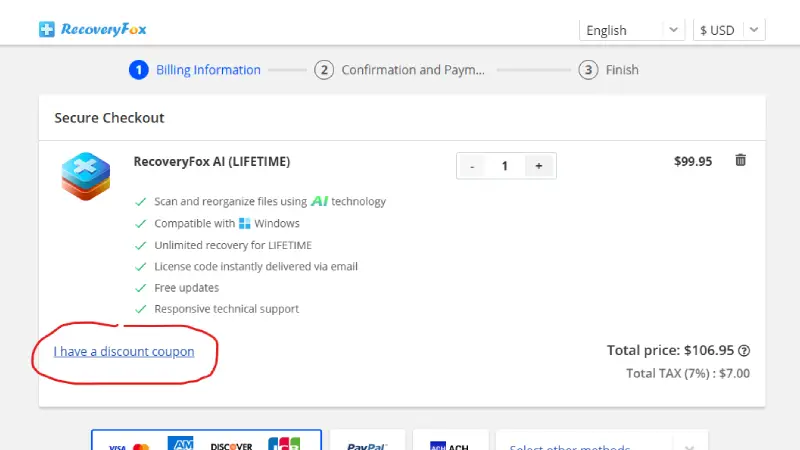
  4. Proceed to checkout. On the checkout page, locate the "I have a discount coupon" link below your items in the order summary.
  5. Click it to expand the field and paste your copied code. The 5% discount applies instantly to the order total.
recoveryfox ai coupon at checkout

Image: RecoveryFox AI

  1. Choose your payment method — PayPal, ACH, Visa, Mastercard, American Express, or other available methods.
  2. Enter your contact and payment details and click "Continue" to complete your purchase.
  3. Your activation key and download link are delivered to your email — save this confirmation email for future licence recovery.

Critical step after purchase: Before running RecoveryFox AI on your recovery target device, download and install it on a different drive than the one you are recovering from. Installing recovery software on the same drive you need to recover from can overwrite the deleted data you are trying to restore.

For the latest verified Windows data recovery and file backup software deals, browse all current offers on CouponGod.

RecoveryFox AI vs Alternatives — Honest Comparison

Buyers evaluating RecoveryFox AI typically compare it against these established alternatives:

RecoveryFox AI vs EaseUS Data Recovery Wizard

EaseUS is the most widely reviewed competitor with thousands of verified user reviews and a longer track record. EaseUS supports Windows, Mac, and mobile data recovery — a broader platform coverage than RecoveryFox AI's Windows-only support. RecoveryFox AI's lifetime plan pricing may be more competitive for Windows-only users who do not need the cross-platform capability. EaseUS data recovery discount codes are available on CouponGod for comparison.

RecoveryFox AI vs Stellar Data Recovery

Stellar has a longer independent review history and published recovery rate testing from HandyRecovery and 7 Data Recovery Experts. RecoveryFox AI's AI-powered scan and privacy-first no-data-collection approach are genuine differentiators. Stellar Data Recovery promo deals are available for comparison.

RecoveryFox AI vs Wondershare Recoverit

Recoverit supports Windows and macOS — a broader platform range than RecoveryFox AI. RecoveryFox AI's lifetime pricing is competitive against Recoverit's subscription model for long-term Windows users. Wondershare Recoverit annual deals are available when running on CouponGod.

RecoveryFox AI vs PassFab iPhone Recovery

PassFab covers iOS-specific data recovery — a completely different use case. If you need iPhone or iPad data recovery rather than Windows PC recovery, PassFab is the relevant tool. PassFab iOS tool savings are available on CouponGod.

Choose RecoveryFox AI if: You need Windows-only data recovery with AI-powered deep scanning, value a privacy-first no-data-collection architecture, want a lifetime licence at competitive pricing, and appreciate the free pre-purchase scan to confirm recoverability.

Refund Policy and Support

RecoveryFox AI offers a 30-day money-back guarantee on paid plans. Contact RecoveryFox AI support within 30 days of purchase if the software fails to recover your data as described.

Support channels: Email support via the contact form on recoveryfox.com. For technical issues, document your device model, Windows version, and the specific data loss scenario when submitting a support request — this accelerates resolution.

Before contacting support for a recovery failure: Confirm you ran the deep scan (not just the quick scan), that the target device had not been heavily used after data loss, and that you are looking for file types supported by RecoveryFox AI. These are the three most common reasons for perceived recovery failure that support teams can often resolve with guidance.

Frequently Asked Questions About RecoveryFox AI Coupons

Is there a free version of RecoveryFox AI?

The unregistered version allows you to scan and preview your data for free, so you can see what's recoverable before deciding to purchase. The free version covers scanning and previewing — saving and recovering files requires a paid plan. Always run the free scan first to confirm your files are detectable before purchasing. 

Does RecoveryFox AI work on Mac?

RecoveryFox AI is currently compatible with Windows OS only. Mac and Android support is not yet available. Mac users should evaluate EaseUS Data Recovery Wizard for Mac or Recoverit as alternatives.

Is my data safe when using RecoveryFox AI?

Operating in read-only mode, RecoveryFox AI maintains data integrity while protecting user privacy. RecoveryFox AI does not collect your data. The entire scanning and recovery process happens locally on your machine — no file data or scan results are transmitted to external servers. 

Can RecoveryFox AI recover data from a formatted drive?

Yes — RecoveryFox AI's AI Scan is especially useful for recovering formatted or permanently deleted files, delving deeper into storage devices to identify and reconstruct lost file structures that conventional methods often miss. Run the free scan on the formatted drive to see what the AI identifies as recoverable before purchasing.

Does the 5% coupon apply to all plans?

Yes — the 5% coupon from the deal card above applies to all four RecoveryFox AI plans: Weekly, Monthly, Yearly, and Lifetime. Apply it to the Lifetime Plan for the maximum absolute dollar saving, given that it is the highest-priced option. 

Can I use one RecoveryFox AI licence on multiple computers?

The standard licence can be used on 1 PC only. If you need coverage across multiple machines, you will need multiple licences. Check RecoveryFox AI's official website for current multi-PC options before purchasing if this is a requirement. 

What types of files can RecoveryFox AI recover?

RecoveryFox AI supports photos, videos, documents, PDFs, zip files, audio, and database files across internal drives, external HDDs and SSDs, USB drives, SD cards, TF cards, and cameras. Compatible file systems include NTFS, exFAT, and FAT32. 

Compare RecoveryFox AI With Similar Data Recovery Tools on CouponGod

About CouponGod

CouponGod is an online source for coupons and promo codes to get discounts on purchases from many top brands.

Follow Us

When you buy through links on CouponGod, we may earn an affiliate commission. Terms of Use

#CouponGod

Blessing Your Wallet with Savings!

© 2019-2026 CouponGod. All rights reserved.

CouponGod
Logo