- All
- Deals
- Coupons
- Sales
What Is MyCleanPC — Product Overview and Company Background
Image: MyCleanPC
MyCleanPC is a Windows PC optimization software developed and sold by iolo Technologies, a California-based software company you may already know from their flagship product System Mechanic. MyCleanPC is iolo's entry-level offering — a more focused, simplified PC cleanup tool designed specifically for everyday home users who want basic performance improvements without the advanced feature set of System Mechanic.
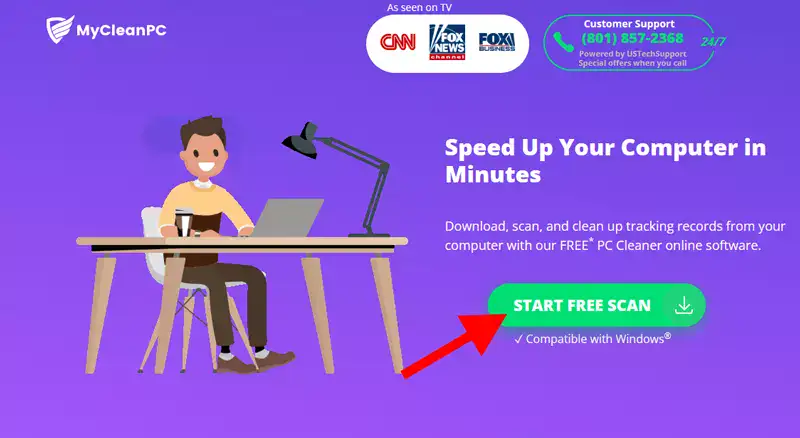
MyCleanPC is PC optimization software that diagnoses and fixes computer issues causing slowness, crashes, freezes, pop-ups, and blue screens. The company offers a free diagnostic tool you can download in minutes to scan for issues leading to common computer problems. After the free scan, you have the option to activate the full version, which includes free antivirus software and access to expert technicians.
MyCleanPC is a computer optimization software designed specifically for Windows users. It does not support Mac or Linux. The software covers junk file removal, registry cleaning, startup optimisation, privacy tracker erasure, and basic malware scanning through its bundled antivirus component.
The relationship between MyCleanPC and iolo is an important context. MyCleanPC markets itself as a standalone product at a lower price point than System Mechanic, but both products are operated by the same company (iolo Technologies, now owned by RealDefense LLC). If you are comparing PC optimization tools, reading the iolo System Mechanic review and deals on CouponGod is worth your time — System Mechanic offers a significantly broader feature set at a price point now comparable to MyCleanPC's full-cost renewal pricing.
MyCleanPC Pricing — And the Billing Warning You Need to Read First
Before applying the coupon code above, read this section in full. It contains the most important information on this page for anyone considering a purchase.
Standard Pricing
- Year 1 promotional price: $39.95 (with the 20% coupon above applied to the standard $49.95 price)
- Year 2+ renewal price: $49.95/year — this is the standard annual price after the introductory first year
- Download and installation: Free diagnostic scan available before purchase
⚠️ LiveTech Billing Warning — Read Before Purchasing
This is the most critical piece of information for any MyCleanPC buyer and is the primary source of verified complaints across Trustpilot, ComplaintsBoard, and Sitejabber.
MyCleanPC bundles LiveTech support — a $19.95/month technical support subscription — with certain purchase options. One verified Trustpilot reviewer reported being charged $19.95/month for six months without realising it, amounting to $120 in unexpected charges on top of the $49.95 annual software cost.
Multiple verified Sitejabber reviewers reported being charged for LiveTech at $21.55/month without authorising it. In documented cases, iolo cancelled the ongoing subscription but refused to refund charges already collected.
The most consistent complaint across verified reviews is that LiveTech support is added to the purchase without clear consent — buyers report they never needed it, never wanted it, and were not clearly informed it would generate a separate monthly charge.
What to do to protect yourself at checkout:
- At the checkout page, look carefully for any mention of a "Bundle," "LiveTech," or "Technical Support" add-on with a separate monthly price
- If you see a pre-ticked bundle option, untick it before proceeding
- If the LiveTech option is presented as included by default, contact MyCleanPC support before completing payment to confirm whether it will generate a separate monthly charge
- After purchase, check your bank or card statement within 30 days to confirm that only the annual software charge has been applied
- Set a calendar reminder for 30 days and 11 months post-purchase to review charges and manage renewal
This warning is included because CouponGod's editorial standard requires honest disclosure of documented consumer issues with promoted products. The software itself has legitimate utility — the problem is specifically with the billing and bundling practices that a minority of users have experienced.
What MyCleanPC Actually Does — Features Breakdown
Free Diagnostic Scan
MyCleanPC offers a free diagnostic tool you can download and run before purchasing. It scans your system and identifies issues causing common performance problems. The free scan is a legitimate and useful first step — it gives you a real picture of what the software can address on your specific PC before you spend any money. Download from mycleanpc.com directly.
Junk File Removal
MyCleanPC boosts computer performance by removing unnecessary files that accumulate over time. This covers temporary files, browser cache, Windows update remnants, recycle bin contents, and other space-consuming files that build up through normal computer use.
Registry Cleaning
Scans and repairs registry errors — broken shortcuts, leftover entries from uninstalled programs, and invalid file associations that can cause sluggish performance and error messages. As with all registry cleaners, create a system restore point before running this feature for the first time.
Startup Optimisation
Identifies and disables unnecessary programs that launch at startup, reducing boot times. One of the most impactful single improvements a PC optimization tool can make — particularly on older machines where startup times have grown significantly.
Privacy Track Removal
Clears browser history, cookies, saved form data, and download history across common browsers. Useful for shared computers or anyone who wants to regularly clear their digital footprint from the local machine.
Bundled Antivirus
The full version includes free antivirus software. Note that this antivirus component is not independently verified by major testing labs like AV-Test or AV-Comparatives — it is a basic protection layer rather than a standalone security suite. If comprehensive antivirus protection is your primary need, a dedicated security tool is more appropriate.
Automated Maintenance
MyCleanPC performs regular automated scans and cleanups on a schedule. You can configure scan frequency from within the software so maintenance runs during idle periods without interrupting your workflow.
LiveTech 24/7 Technical Support (Add-on — see billing warning above)
Live phone and remote access technical support from iolo-trained technicians. G2 reviewers who specifically used the tech support component reported positive experiences — technicians were described as knowledgeable and patient in resolving issues. The service itself appears to be of genuine quality when used intentionally. The documented problem is specifically with how it is added to purchases without adequate consent — not with the support quality itself.
Honest Assessment — Strengths and Real Limitations
Image: Trustpilot
Genuine strengths:
G2 reviewers consistently praise MyCleanPC's powerful scanning engine and user-friendly interface. The platform is described as straightforward to navigate without requiring technical experience.
The software helps erase files that cause computer slowdowns and crashes in a few simple steps — users in IT environments specifically noted that deploying MyCleanPC across user machines eliminated incoming support calls about PC slowness.
Long-term iolo customers — some with nearly a decade of use — consistently praise the constant software updates and the quality of technical support when the LiveTech service is used intentionally and legitimately.
The free diagnostic scan is a genuine, no-commitment way to evaluate what the software can address on your specific machine before purchasing. Unlike some "free scan" tools that report inflated problem counts to create urgency, the MyCleanPC scan covers real file categories with verifiable results.
Real limitations to know before buying:
MyCleanPC earns a 2.2-star rating on ComplaintsBoard from 20 verified complaints — the majority of dissatisfied users cite the unauthorized LiveTech charges and deceptive marketing practices. This is a lower trust signal than most PC utility tools covered on CouponGod.
MyCleanPC may flag harmless files as issues, potentially causing unnecessary concern or actions. False positives on registry scans are a known characteristic of the software category — review flagged items before taking action, particularly on registry entries.
Windows 11's built-in tools — Storage Sense, Task Manager, Startup Manager, and Windows Security — cover many of the same functions as MyCleanPC at no cost. If your PC runs Windows 11 and your primary needs are junk file removal and startup management, test the native tools before purchasing third-party software.
At a $49.95/year renewal, MyCleanPC is priced similarly to iolo System Mechanic Standard, which offers a broader feature set, including NetBooster, advanced registry repair, and Smart ActiveCare. Before renewing MyCleanPC, compare the iolo System Mechanic current pricing — the upgrade may be worth considering at a similar cost.
The honest bottom line: MyCleanPC is legitimate PC cleanup software that does what it claims for junk file removal, startup optimisation, and basic privacy clearing. The software quality itself is not the problem. The documented billing practices around LiveTech bundling require careful attention at checkout. If you proceed with your eyes open about the billing structure, the $39.95 first-year price with the 20% coupon is reasonable for the functionality provided.
How to Apply a MyCleanPC Coupon Code
- Click "Show Code" on the deal card above to copy your discount code.
- Click "View Deal" — this takes you directly to the MyCleanPC checkout page.
- On the checkout page, review the order summary carefully on the right side — confirm what is included and whether any add-ons are pre-selected.
- Look for the "Promo Code" or "Discount Code" field — paste your code and click Apply.
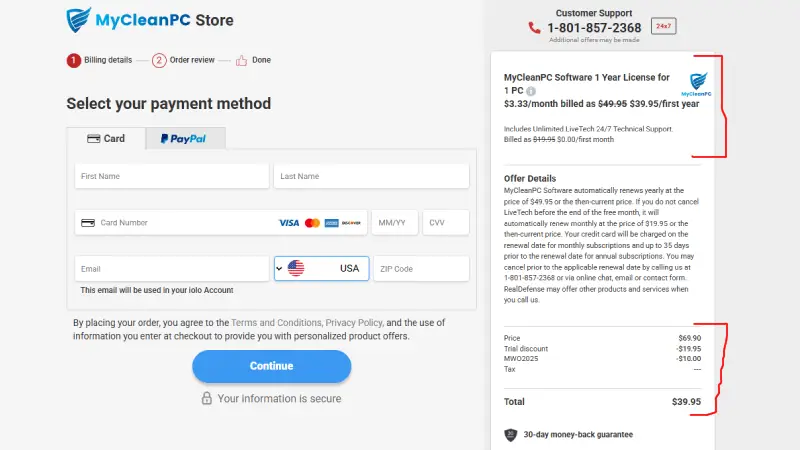
Image: MyCleanPC
- Confirm that the discounted price of $39.95 appears before proceeding.
- Select your payment method — credit card or PayPal — and complete your details on the left side of the checkout.
- Review the complete order total one final time before clicking "Continue" — confirm no unexpected monthly charges appear.
- Your activation code is delivered to your email address after payment.
Tip: The current deal applies automatically through the affiliate link — the 20% discount may be pre-applied when you click View Deal. If the price still shows $49.95, paste the copied code in the promo field.
For the latest verified Windows performance and PC utility deals, browse all current software offers on CouponGod.
Other Ways to Save on MyCleanPC
Run the free scan first - Download the free diagnostic tool from mycleanpc.com before purchasing. Confirm the scan identifies real performance issues on your specific machine before committing money. If the scan shows minimal issues, your PC may not need optimization software at this time.
Consider iolo System Mechanic instead - At similar renewal pricing ($49.95/year for MyCleanPC vs $37.47–$42.47 with iolo coupons for System Mechanic Standard and Pro), System Mechanic offers a broader feature set including NetBooster, Smart ActiveCare, and deeper RAM optimisation. If you are evaluating both, Iolo System Mechanic discount codes are verified and available on CouponGod.
Watch the renewal price - The promotional first-year price of $39.95 renews at $49.95 after year one. If you see this renewal approaching on your bank statement, check for current promotional pricing on CouponGod before simply allowing the auto-renewal — the 20% introductory discount may be available again for a new subscription.
Black Friday and seasonal sales - iolo/MyCleanPC products typically reach deeper discounts during the November sale window. I maintain a holiday season PC software deals page updated each year — worth checking if your purchase timing is flexible.
MyCleanPC Refund Policy and Support
Refund policy: MyCleanPC does not prominently advertise a money-back guarantee period on its main pricing page. Based on documented Trustpilot cases, iolo/MyCleanPC has processed refunds for the annual software charge in some documented cases — but refunds for accumulated LiveTech charges have been refused in several verified complaints. Review the current refund terms at mycleanpc.com before purchasing.
Support channels: Phone support at the number provided in your purchase confirmation email. G2 reviewers report that tech support quality is genuinely strong — technicians are knowledgeable, patient, and effective at resolving issues when engaged directly. The support quality concern relates specifically to billing dispute resolution, not technical assistance.
To cancel or manage your subscription: Log in to your account at mycleanpc.com or contact support directly. If you experience unauthorized charges, contact both MyCleanPC support and your bank or card issuer simultaneously — the documented cases where iolo refused refunds were, in some cases, resolved through card dispute processes.
Frequently Asked Questions About MyCleanPC Coupons
Is MyCleanPC a legitimate product or a scam?
What is MyCleanPC LiveTech?
Does MyCleanPC work on Windows 11?
Is there a free version of MyCleanPC?
How does MyCleanPC compare to iolo System Mechanic?
Can I cancel MyCleanPC auto-renewal?
What is the MyCleanPC renewal price?
Compare MyCleanPC With Similar PC Optimization Tools on CouponGod
Given the documented billing concerns with MyCleanPC, these alternatives are worth comparing before making a final decision:
-
- iolo System Mechanic Coupon Deals — same parent company; broader feature set at similar renewal pricing; more transparent billing track record
- IObit Advanced SystemCare Offers — a direct competitor with a modern interface; similar upsell warnings apply, but a different billing model
- Glary Utilities Pro Subscription Codes — 90-day refund guarantee; 30 tools in one licence; strong alternative with transparent pricing
- AOMEI Disk Backup and Tune Deals — disk management and backup; complements basic PC cleanup
- Driver Easy Update Manager Discounts — dedicated driver management if outdated drivers are your primary performance issue
- Revo Uninstaller Pro Savings — a specialist uninstaller that removes software remnants more thoroughly than MyCleanPC's built-in tool
- PC Performance Optimizer Comparison — our guide comparing MyCleanPC, iolo, IObit, Glary Utilities, and others
- All Windows Utility Software Coupons — every verified PC software deal currently live on CouponGod
- Black Friday PC Software Sale — deepest annual discounts on PC optimization and utility tools