

- All
- Deals
- Coupons
- Sales
FlexClip Coupons & Deals - Quick Recap
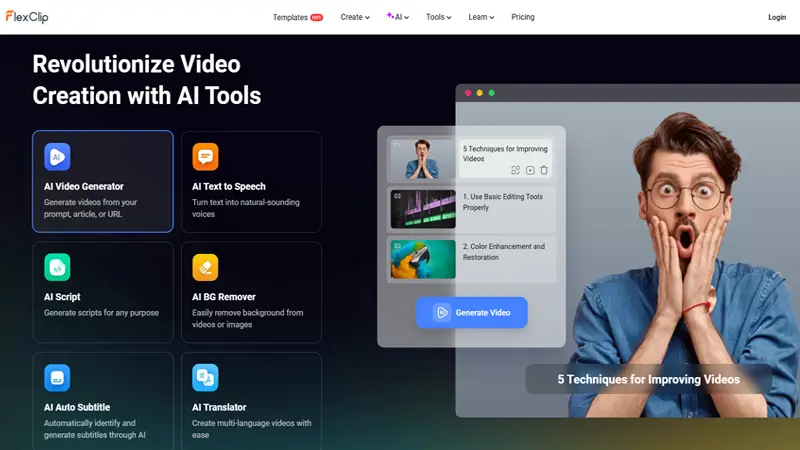
Image: Flexclip.com
Before we get into the details, here’s what you’ll find on this page:
- Best value coupon for teams & agencies - Extra 30% off Business plan
- Get an additional 20% off any plan - applies to both Plus and Business plans
- Flat 10% off any plan - reliable fallback if the higher codes have expired
- 40% Student Discount - Confirmed by FlexClip’s Educational Pricing Program
- Free plan - forever, no coupon needed, no credit card required
All codes on this page are tested manually at FlexClip’s checkout before publishing. If a code isn't working, use the downvote button on the deal card - I check reports and remove invalid codes promptly. You can also check out the latest software coupons on CouponGod for any newer FlexClip offers.
How to Redeem a FlexClip Coupon Code
- Click "Show Code" on the deal card above — the code is copied to your clipboard automatically on most browsers.
- Click “View Deal” to go directly to the pricing page of FlexClip.
- Choose your plan (Plus or Business) and click the upgrade button.
- Sign in to your FlexClip account or create a new account if you're a first-time user.
- In the checkout/payment page, under the order summary, look for the field “Have a coupon?”.
- Paste your code and check the discounted price before you pay with PayPal or a credit card.
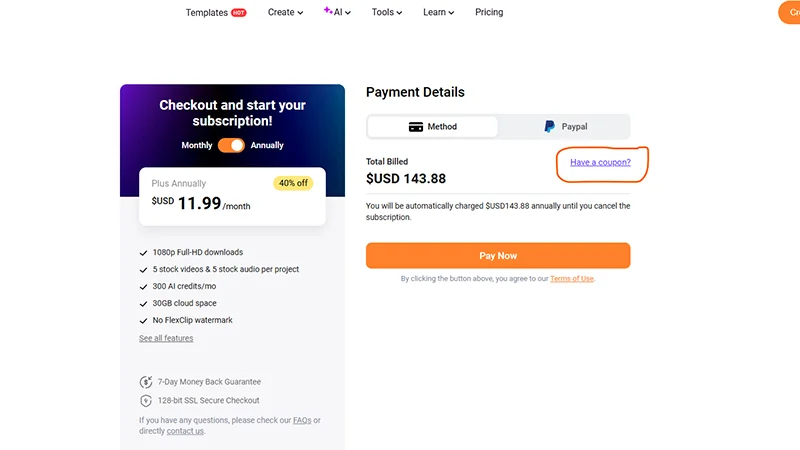
Image: Flexclip.com
Important: FlexClip discount codes are case-sensitive. The 30% Business plan code and 20% any plan code are separate — paste them as shown. Only one coupon code is allowed per order.
Which FlexClip Plan Do You Actually Need?
FlexClip is a freemium product with two paid tiers and a standalone AI Credits plan. Here’s an honest breakdown of each so you know exactly where your coupon applies:
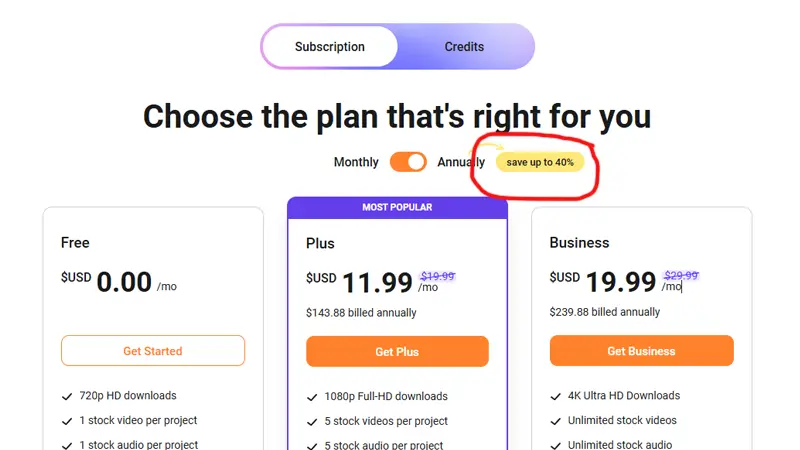
Image: Flexclip.com
Free Plan — $0
The free plan exports at 720p with a FlexClip watermark, limits videos to 10 minutes, and only allows 1 stock video and audio per project. It does work fine for checking out the platform, or for casual personal content where watermarks are not a problem. No coupon needed, just sign up at flexclip.com.
Plus Plan — $11.99/month (billed annually)
Plus plan removes watermark and gives you access to 1080p Full HD exports without length limits. Includes 5 stock assets per project. 30GB of cloud storage. 100GB export storage. 3,600 AI credits per year (300/month). This is the right plan for individual content creators, freelancers, bloggers, and small business owners who create video on a regular basis. To get the best annual price, use this 20% off coupon.
Business Plan — $19.99/month (billed annually)
The Business plan adds unlimited stock media per project, 100GB cloud storage, 1TB export storage, and 9,600 AI credits per year. This tier is a good choice for marketing teams, agencies, and businesses running high-volume social media or video ad campaigns. You can use the 30% off Business plan coupon on this page to get the annual cost down even further – this is the best value code currently available.
AI Credits Plan starting at $9.99 for 300 credits
A standalone option for users who want to use FlexClip’s AI generation tools (text-to-video, AI image generation, and auto subtitles) without paying for a subscription. Good for occasional users who don't require the whole editing suite.
Who Should Not Use FlexClip:
FlexClip is not for multi-track timeline editing, color grading, or advanced audio mixing. It's for beginners and intermediate users who want polished results fast. Professional video editors using Premiere Pro or DaVinci Resolve won't have a reason to switch.
FlexClip's True Strengths
FlexClip is a browser-based online video editor created by PearlMountain. It empowers users to create professional-looking videos using 6,000+ templates, 4M+ stock media assets, and a growing suite of AI tools, including text-to-video generation, auto subtitles, and AI script writing.
But its real power is in speed. From template to finished video in 10-15 minutes is truly possible for typical social media formats — product promos, YouTube intros, slideshow explainers, and short-form ads. Best for beginners, small businesses, and social media marketers who need polished videos quickly without learning a complex editing program.
Where it has real limitations: Export speed can be slower than expected, especially on longer or higher-resolution projects. Its single video track and restrictions on advanced editing diminish its usefulness for professional editors. And one thing worth knowing from real user reports is: FlexClip does not send renewal reminders before annual billing — screenshot your cancelation confirmation if you decide to cancel, as some users have reported difficulty getting refunds after auto-renewal.
More Ways to Save on FlexClip
Annual billing over monthly: The biggest built-in discount that FlexClip offers is paying annually rather than monthly. The Plus plan goes from a higher monthly rate to $11.99/month on annual billing. Add another 20-30% coupon code on top of that, and the savings really add up.
Student & Education Discount: FlexClip offers a verified 40% educational discount. The above deal card links directly to this offer. You will need to validate your student status at checkout. This is the largest single discount you can get and applies to the Plus or Business plan.
Free plan to actually get started - With many tools, the free tier is so limited it’s barely usable. FlexClip’s free plan is usable enough to assess whether the tool fits into your workflow before spending a dime. Start free, then use a coupon to upgrade.
Black Friday - FlexClip offers deeper discounts consistently during the November sale period. Every year I publish a dedicated Black Friday software deals page – well worth a look if you’re not in a rush to buy.
FlexClip vs Competitors – Fair Comparison
If you’re comparing FlexClip to other tools, this is where each one makes more sense:
FlexClip vs InVideo
The closest direct competitor is InVideo. The Business plan of InVideo is priced at $25/ month, which makes the Business plan of FlexClip much more affordable, especially after applying the 30% coupon. InVideo has a more powerful text-to-video engine for long-form content; FlexClip has a more extensive stock media library and a cleaner editing interface for short-form video.
Canva vs FlexClip
Canva is better for all-in-one design work, like social graphics, presentations and documents. If your main focus is creating videos, FlexClip has more powerful video-specific features, including better AI tools and more video templates. If you’re already using Canva Pro for design, you may not need FlexClip separately.
FlexClip vs. Wondershare
Wondershare Filmora is a desktop-based editor aimed at intermediate users looking for more control over their editing. FlexClip is web-based and better for quick turnaround. If you’re editing long-form YouTube videos with complex cuts, Filmora is the more powerful option.
FlexClip vs. AVS4You
AVS4You come as a complete desktop video editor, part of a wider media bundle. If you want video editing along with audio conversion, image editing, and DVD burning all in one package, AVS4You's bundle provides more. FlexClip wins for its ease of use and variety of templates for web-first content.
To see more verified deals on similar video and software tools, visit the Software Coupons category on CouponGod.
FlexClip Refund Policy and Support
Money-back guarantee: FlexClip provides a 7-day money-back guarantee on paid plans. You can request a refund on their official support page: flexclip.com/support. According to user reviews, the refund process is generally straightforward within the guarantee window. The main problem reported is auto-renewal without email notice beforehand on annual plans, so set a personal calendar reminder before your annual renewal date.
Cancelation: You can cancel subscriptions at any time in your account settings, and your plan will remain active until the end of the current billing period.
Support: FlexClip offers live chat support on their website. Response times are usually quick during business hours.
Frequently Asked Questions
Can I redeem a FlexClip coupon on the free plan?
Do FlexClip coupons work for existing users upgrading plan?
Is FlexClip available as a lifetime deal?
Does FlexClip work on Mac and mobile?
How many AI credits do I get with each plan?
What happens to my videos if I cancel my subscription?
More Software Deals at CouponGod
Looking for verified coupons on similar video & creative tools? These pages describe the nearest alternatives and complementary software:
- Software Coupons — all verified software deals in one place
- InVideo Coupon Codes — a direct FlexClip alternative for online video creation
- Wondershare Discount Codes — desktop video editing with Filmora and more
- AVS4You Promo Codes — full media suite bundle, including video editing
- CreateStudio Deals — animation and video creation software
- Best PC Optimizer Software for Windows — if you're also looking to speed up your editing machine
