

- All
- Deals
- Coupons
- Sales


Coohom Plans Explained - Which One Do You Need?

Image: mycoupongod.com
Coohom offers four pricing plans: a forever-free Basic plan, a Pro plan at $25/user/month (billed annually at $300/year or $30/user/month), an Elite plan at $58/user/month (billed yearly), and an Enterprise plan with custom pricing for larger teams. Here's an honest breakdown of who each plan is best for:
Basic — Free Forever
Includes 2D and 3D floor plan creation, standard image rendering, and access to a part of the model library. Very helpful for people doing a single renovation or students learning the basics of 3D design. The main limitation is the rendering quota – you have a fixed number of renders per month before you hit the cap.
Pro Plan — Best for Freelance Designers & Serious DIY Users
Adds unlimited projects, AI design tools, 4K rendering quality, and a hugely expanded brand library. This is the plan that most individual interior designers and architects use on a daily basis. It's 73% off with our coupon code and the best-value entry point for professional use.
Elite Plan – Great for client-facing professional work
The Elite plan, at $58 per user, per month annually, offers advanced features like 8K renderings and 1080p video walkthroughs, both of which are important when presenting designs to paying clients. If you are a professional designer who does rendered presentations regularly, the 8K output and video functionality justify the price difference over Pro.
Enterprise — Best for Furniture Retailers and Design Firms
Coohom’s enterprise solutions are designed for the interior design, furniture and home décor, and kitchen and bath industries, with custom catalogs, API access, and team management tools. Coohom negotiates pricing directly. Not applicable to single users.
How to Use a Coohom Coupon Code
- Click "Show Code" on the deal card above — the code copies to your clipboard automatically on most browsers.
- Click "View Deal" to open the Coohom pricing page directly.
- Select your preferred plan (Pro or Elite) and choose annual or monthly billing.
- At the checkout page, look for the "Have a promo code?" field.
- Paste your code and confirm the discounted price updates before entering payment details.
- Complete payment via credit/debit card or PayPal.
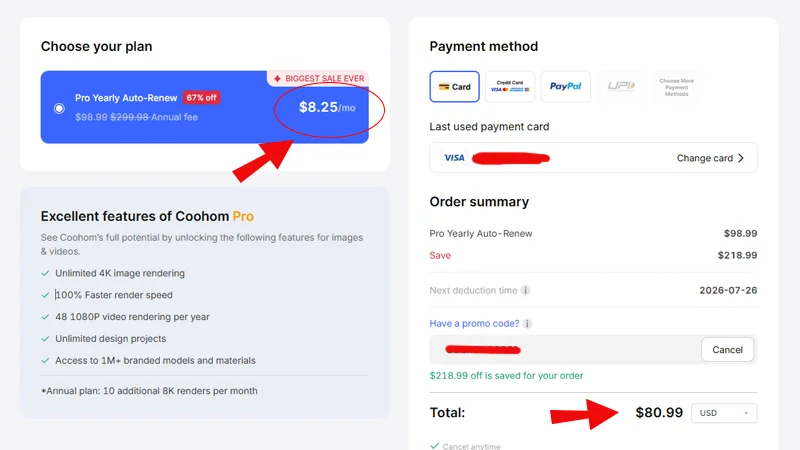
Image: Coohom.com
If the code is not functioning: Coohom codes are case-sensitive. Some are for one-time use or have an expiration date. Please try clearing your browser cache or opening in a private/incognito window. If the problem persists, please hit the downvote button on the deal card. I check all reports and quickly remove invalid codes. You can also find the latest software deals on CouponGod for more up-to-date Coohom offers.
Other Ways to Save on Coohom
Beyond the coupon codes on this page, there are a few reliable ways to reduce your Coohom costs:
Start with the Free Basic Plan first. Coohom's free tier is genuinely functional — not a crippled trial. Use it for one project before committing to a paid plan. You'll know within a few sessions whether the Pro upgrade is worth it for your workflow.
Choose annual over monthly billing. Even without a coupon code, the annual Pro plan at $25/month is significantly cheaper than the $30/month rate. With our 73% off coupon, the annual plan drops to under $7/month — the biggest saving available.
Watch for Black Friday deals. Coohom runs its steepest promotions during the November sale period. I publish a dedicated Black Friday software deals page each year — worth bookmarking if your project timeline is flexible.
Check for student or education pricing. Coohom has worked with design schools and occasionally offers education discounts not listed publicly. If you're a student, contact their support directly to ask — this isn't widely advertised.
Coohom vs Alternatives — Honest Comparison
If you're evaluating Coohom against other 3D interior design tools, here is a straightforward comparison for the most common use cases:
Coohom vs Planner 5D
Planner 5D is simpler and more accessible for total beginners, with a free tier and lower-cost paid plans. Coohom has significantly better rendering quality and a larger professional model library. For hobbyists planning a single room: Planner 5D. For designers needing client-ready visuals: Coohom.
Coohom vs SketchUp
SketchUp offers far deeper 3D modelling and drafting control and is the industry standard for architects. However, it is more difficult to learn, and rendering requires third-party plugins like V-Ray. Coohom is faster to learn and produces comparable renders out of the box. For construction documentation: SketchUp. For interior visualization and client presentations: Coohom.
Coohom vs Homestyler
Homestyler is free and browser-based with a similar drag-and-drop interface. Coohom wins on rendering resolution, model library size, and professional output quality. If budget is the only consideration: Homestyler. If output quality matters, Coohom Pro with our coupon code is close in cost to Homestyler's paid tier.
Coohom vs Wondershare tools
If you're already in the Wondershare ecosystem for video or creative work, note that Wondershare does not have a direct interior design competitor to Coohom. Browse our Wondershare coupon codes separately if you need Filmora or other Wondershare products.
Coohom Refund Policy and Support
Refund Policy: Coohom offers refunds in some circumstances, generally for a short time after purchase if a technical issue with the software cannot be resolved. Unlike some software providers, Coohom doesn’t offer a 30-day money-back guarantee. Be sure to read their current refund terms on the checkout page before you buy, especially if you are purchasing an annual plan.
Support: Coohom offers live chat support as well as an email ticket system. Generally, response times are within 24 hours on business days. Their help center at coohom.com/support addresses most common questions about floor plans, rendering, and account management.
Compatibility: Coohom is completely web-based and runs on any modern browser on Windows, macOS, and Linux. Mobile apps are available on iOS and Android to view and do basic edits. No need to install any software.
FAQs on Coohom Coupons
Does Coohom offer a free trial?
Can I use a Coohom coupon code on a renewal?
Is the deal for 73% off legitimate?
Does Coohom work offline?
How many users does Coohom have?
Explore More Software Deals on CouponGod
Looking for verified discounts on other design and creative software? These pages cover related categories:
- Software Coupons — all verified software deals in one place
- Wondershare Coupon Codes — video editing and creative tools, including Filmora and PDFelement
- InVideo Promo Codes — AI video creation and editing software
- FlexClip Deals — easy online video and design tool
- CreateStudio Coupons — animation and video creation software
- OnlyOffice Promo Codes — office suite and document collaboration tools
- Black Friday Software Deals — the best annual sale for software discounts
