Cloudways Promo Code - May 2026

Verified by Hemant Kumar, Founder of CouponGod · Last updated: May 07, 2026
Categories
  • All
  • Deals
  • Coupons
  • Sales
Cloudways Free Migration Offer: 30% Off for 3 Months
Coupon
3 days ago 50 days left Verified by Hemant Kumar

Cloudways Free Migration Offer: 30% Off for 3 Months

Get a flat 30% discount for 3 months on Cloudways hosting plans with our exclusive promo code. Enjoy unlimited free expert-led migrations without paying extra migration fees for every website. ...
VIEW DEAL
SHOW CODE
Cloudways Discount Coupon Code: 10% OFF for First 3 Months
Coupon
2 months ago Verified by Hemant Kumar

10% OFF for First 3 Months

Cloudways Discount Coupon Code: 10% OFF for First 3 Months
VIEW DEAL
SHOW CODE
Cloudways Free Trial Offer: Try 3 Days Account without Card (Risk-Free)
Deal
Cloudways offers premium managed cloud hosting for free for three days, with no credit card needed to start your trial. Before you choose a plan (which starts at $11/mo), try out powerful ...
Cloudways Cloud Hosting Discount: 30% OFF for 4 Months
Coupon
2 months ago Verified by Hemant Kumar

30% OFF for 4 Months

Cloudways Cloud Hosting Discount: 30% OFF for 4 Months
VIEW DEAL
SHOW CODE
Cloudways Verified Promo Code: 20% OFF for Two Months
Coupon
2 months ago Verified by Hemant Kumar

Get 20% Off Managed Cloud Hosting for Two Months

Cloudways Promo Code: Get 20% Off Managed Cloud Hosting for Two Months
VIEW DEAL
SHOW CODE
Cloudways 30% Off Code for 2 Months – Save Up To $100
Coupon
2 months ago Verified by Hemant Kumar

30% Off for 2 Months

Cloudways Hosting Deal: Save Up to $100 by Getting 30% Off for 2 Months
VIEW DEAL
SHOW CODE
Show next

What Is Cloudways — And Why It's Different From Regular Hosting

Cloudways Promo Code

Image: Cloudways.com

Cloudways is a managed cloud hosting platform. Google Cloud, DigitalOcean, and AWS are the "landlords" who own the massive, fast servers. Normally, renting directly from DigitalOcean requires complex coding knowledge. Cloudways acts as a bridge — they rent the powerful server for you and give you a simple, user-friendly control panel to manage it.

In practical terms: you get the raw speed and reliability of enterprise cloud infrastructure without needing to configure servers, manage security patches, or touch a command line. Cloudways serves over 100,000 customers and hosts more than 570,000 websites worldwide. Since August 2022, Cloudways has been owned by DigitalOcean, which acquired the company for $350 million in cash.

Cloudways currently offers two distinct hosting products — Flexible and Autonomous — which work very differently and suit different types of users.

Cloudways Flexible — The Core Product

Cloudways Flexible offers the freedom to choose from top cloud providers and deploy various PHP-based apps like WordPress, Magento, and Laravel. Users can customize server specifications and pay only for the resources they use.

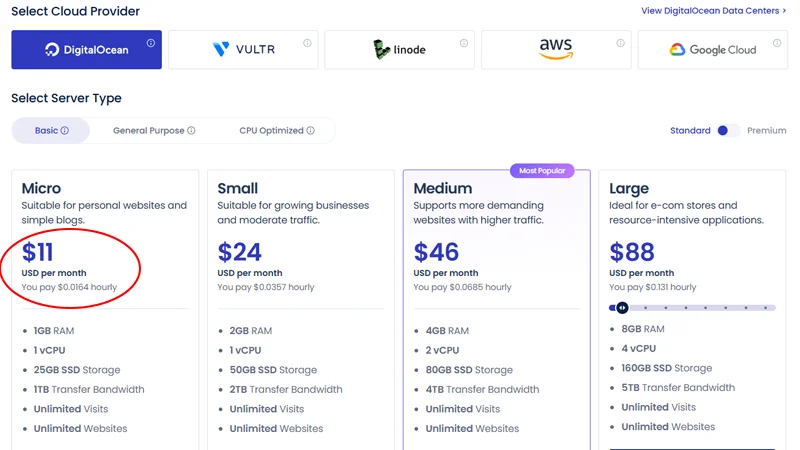
You can choose from five leading cloud providers: DigitalOcean, AWS, Google Cloud Platform, Vultr, and Linode. For most users — small businesses, bloggers, freelancers, and agencies — DigitalOcean offers the best balance of cost and performance as a starting point.

Pricing starts at $14/month for a DigitalOcean 1GB RAM server. The recommended entry point for most WordPress sites is the 2GB RAM plan at $24/month, which provides noticeably better performance for sites with moderate traffic. Unlike competitors who lock you into 3-year contracts, Cloudways offers a 3-day free trial without requiring a credit card.

Every Cloudways server comes pre-configured with a powerful performance stack: Varnish for full-page caching, Redis and Memcached for object caching to speed up database queries, Cloudflare Enterprise CDN across 300+ global edge servers, and PHP-FPM for optimized PHP processing.

In 2026, every plan will also include the Lightning Stack and AI Copilot credits as standard features. The AI Copilot monitors server health and offers SmartFix resolutions for common errors — a useful addition for non-technical users who want proactive server management.

Cloudways Autonomous — Hands-Off WordPress Hosting

Cloudways Autonomous is a hands-off managed WordPress solution built on Kubernetes. It provides autoscaling and an integrated enterprise CDN for enhanced performance, removing the need for infrastructure and traffic management so businesses can focus on growth.

Autonomous is designed for WordPress sites that need to handle unpredictable traffic spikes automatically, without manual server scaling. If you run a WooCommerce store that experiences flash sale traffic surges or a WordPress publication with viral traffic events, Autonomous handles scaling invisibly in the background.

The promo codes on this page apply to Cloudways Flexible plans. For Autonomous pricing, visit cloudways.com directly, as pricing is calculated differently based on your specific traffic and resource requirements.

Cloudways Features — What You Actually Get

Multiple Cloud Provider Choice

You can choose from DigitalOcean, Vultr, Linode, AWS, and Google Cloud Platform. This means your hosting infrastructure is genuinely different depending on your choice — not a superficial rebrand. AWS and Google Cloud carry higher price points but offer more global data center locations and enterprise-level SLAs.

Standard vs Premium Storage

Cloudways offers two storage tiers. Standard plans use DigitalOcean's regular SSD servers — cost-effective and reliable for small to medium sites. Premium plans use DigitalOcean's high-performance servers with NVMe storage and faster CPUs — better for high-traffic sites where page load speed directly affects conversions.

Pay-As-You-Go Billing

Cloudways uses hourly billing — you only pay for the exact resources you consume. This is particularly useful for agencies managing seasonal client sites and developers testing applications who don't want to pay for unused resources during downtime periods.

Built-In Performance Stack

Performance features include SSD storage, advanced caching layers (Varnish, Memcached, Redis), and Cloudflare CDN integration. These are pre-configured — you don't need to set them up manually as you would on a raw cloud server.

Security

Cloudways offers robust security, including DDoS mitigation, vulnerability scanning, 1-click SSL installation, automated protection with Fail2Ban, OS-level firewalls, and regular automated security patches.

Staging Environments

Create staging environments to test updates, redesigns, or plugins before pushing them to your live site. A critical feature for agencies managing client sites — staging is included on all plans without additional cost.

Automated Backups

Make on-demand backups of files and databases, plus schedule automatic server-level backups covering all applications. Backup frequency and retention period are configurable in the dashboard.

Migration Tool

Easily transfer your WordPress site and database from your current host to Cloudways without any technical hassle. The Cloudways Migrator plugin handles the technical side — you don't need to manually transfer files or databases.

WP-CLI and SSH Access

Access the WordPress command-line interface for faster, more advanced site management. SSH and SFTP are also available — important for developers who need direct server access beyond the dashboard.

Add-Ons

Cloudways does not host your email accounts directly on the server. You will need a separate add-on or third-party email service. They offer a Rackspace email add-on at $1/month per mailbox, or you can connect to Google Workspace or Zoho Mail independently. This is worth knowing upfront — it is the most commonly missed limitation by new Cloudways users switching from shared hosting, where email is bundled.

Honest Assessment — Cloudways Strengths and Real Limitations

Genuine strengths:

Cloudways has great performance, especially considering the price. It performs strongly across reliability, speed, and stress testing. Independent benchmark testing consistently places Cloudways above traditional shared and managed WordPress hosts on Time to First Byte (TTFB) metrics.

Cloudways stands out by offering unlimited websites on a single server, flexible pay-as-you-go pricing, and the freedom to choose your cloud provider — making it ideal for small businesses, agencies managing multiple client sites, and cost-conscious developers who still want top-tier performance.

Unlike competitors who lock you into 3-year contracts, Cloudways offers a 3-day free trial without requiring a credit card. This shows confidence in their product.

Cloudways provides 24/7 free technical support with an average response time of 90 seconds. This is the fastest average live chat response time in the managed hosting category and a genuine operational differentiator against competitors like Kinsta and WP Engine.

Real limitations to factor in:

Pricing is higher than budget hosts like Hostinger or DreamHost. At $14–24/month for entry-level plans, Cloudways is not the right choice if you are building a personal hobby site on a minimal budget. For that use case, Hostinger's managed WordPress plans at $2.99–$7.99/month are more appropriate.

Managing servers and configurations through Cloudways' dashboard may have a learning curve for beginners unfamiliar with hosting environments. If you have never managed hosting beyond a shared cPanel account, expect a few hours of learning time before the platform feels intuitive.

No email hosting is included — you need a third-party email solution. This adds cost and complexity for users moving from shared hosting, where email was bundled.

Cloudways allows users to customize resources as needed, but users may incur additional charges if they exceed their allotted resources, which could disrupt budget planning. Monitor your resource usage in the dashboard, especially during traffic spikes, to avoid unexpected charges.

Cloudways is a dedicated platform for PHP-based applications. If you are looking for non-PHP-based managed hosting, Cloudways is not for you. Node.js, Python, or Ruby applications are not natively supported on the Flexible platform.

How to Apply a Cloudways Promo Code

  1. Click "Show Code" on the deal card above to reveal your promo code.
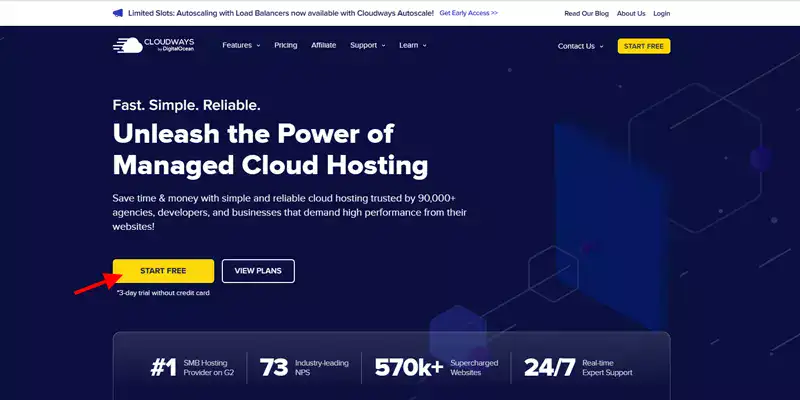
  2. Visit cloudways.com and click "Start Free" to begin account registration.
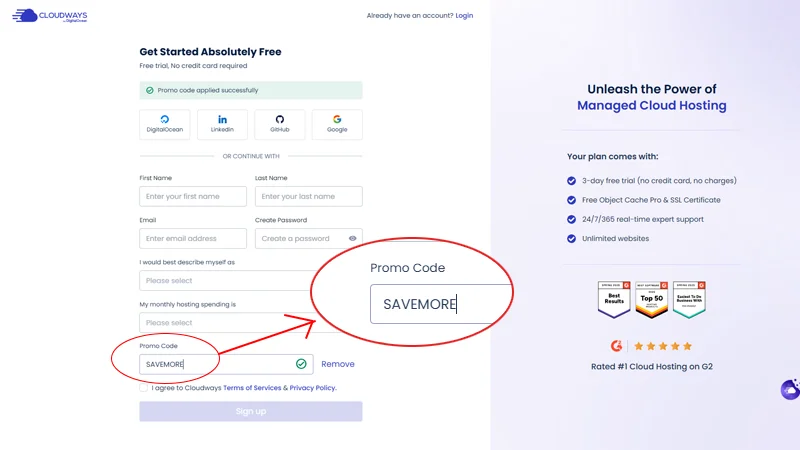
  3. Fill in your name, email, and password. You can also sign up using your GitHub, LinkedIn, or Google account.
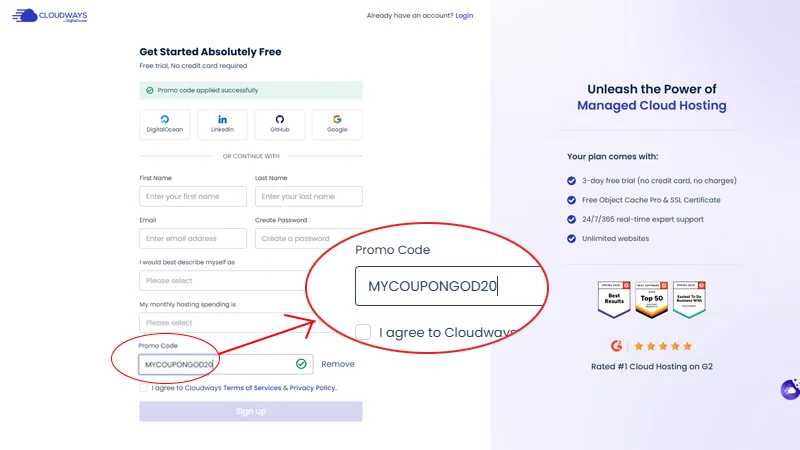
  4. On the signup page, look for the "I have a Promo Code" field — enter your code there during account creation, not at a later stage.
  5. Verify your phone number via the activation code sent to your device.
  6. Confirm your email address via the verification link.
  7. Your 3-day free trial begins immediately — no credit card required for the trial period.
  8. After the trial, enter your payment details to continue, and your promo discount applies automatically to your first billing period.

Important: The promo code field appears during the initial signup process. If you miss it during signup, contact Cloudways support via live chat — they can manually apply the code to your account within the first billing cycle in most cases.

For the broadest range of verified managed WordPress hosting discounts, check all current hosting deals on CouponGod.

Cloudways Pricing — Choosing the Right Plan

Cloudways offers flexible pay-as-you-go pricing with no long-term contracts required. Plans start at $14/month for DigitalOcean. Here is a practical guide to choosing between the main options:

DigitalOcean 1GB RAM — $14/month

Entry point for small WordPress sites with low-to-moderate traffic. Suitable for personal blogs, portfolio sites, and early-stage business sites under 10,000 monthly visitors.

DigitalOcean 2GB RAM — $24/month (recommended starting point)

Better performance and headroom for growth. Handles most WordPress and WooCommerce sites comfortably up to 50,000 monthly visitors. The jump from 1GB to 2GB is worth the extra $10 for most serious sites.

DigitalOcean Premium NVMe — from $25/month

NVMe storage provides significantly faster read/write speeds than standard SSDs. Best for WooCommerce stores, membership sites, and any site where database query speed directly affects page load times.

AWS and Google Cloud — from $36–$40/month

Higher cost but broader global server location coverage and enterprise SLAs. Best for businesses with traffic spread across multiple continents or enterprise compliance requirements.

Cloudways Add-Ons

Cloudflare Enterprise CDN: $4.99/domain/month — worth adding for high-traffic sites where global CDN coverage significantly reduces load times for international visitors.

Cloudways vs Competitors — Who Should Choose What

While SiteGround is cheaper upfront, its renewal prices jump significantly after the initial period. Kinsta and WP Engine are excellent, but start at $30+ per month with limited site counts. Cloudways stands out by offering unlimited websites on a single server with flexible pay-as-you-go pricing.

Choose Cloudways if: You manage multiple WordPress sites and want to host them all on one server, you need flexibility to scale resources up and down, you are a developer or agency comfortable with a slight learning curve, or you want managed hosting without long-term contracts.

Consider WPX if: You want managed WordPress hosting with a simpler setup and an included CDN at a comparable price. WPX is more beginner-friendly with less configuration required. WPX managed hosting deals are available on CouponGod.

Consider Hostinger if: Budget is your primary concern. Hostinger's shared and cloud plans start significantly lower than Cloudways. The performance gap is real but acceptable for low-traffic personal sites. Hostinger introductory discounts regularly reach 75–80% off.

Consider Liquid Web if: You need VPS, dedicated server, or enterprise WooCommerce hosting with fully managed infrastructure and phone support. Liquid Web managed server offers cover multiple hosting types at higher price points.

Consider Kinsta if: You want the simplest possible managed WordPress experience with zero server configuration and are willing to pay a premium for that simplicity. Kinsta starts at $35/month for a single site.

Refund Policy and Support

Free trial: Cloudways doesn't offer a traditional money-back guarantee, but the 3-day free trial without requiring a credit card lets you test the platform completely risk-free. You can cancel anytime during the trial at no cost.

Post-trial billing: After the trial ends, billing switches to pay-as-you-go hourly charges. You can delete your server and stop charges at any time — there are no minimum commitment periods or cancellation fees.

Support: Cloudways provides 24/7 free technical support with an average response time of 90 seconds. Live chat is the fastest channel. A ticket-based system handles more complex issues. Phone support is not available — live chat and ticketing are the only official support channels.

Frequently Asked Questions About Cloudways Coupons

Does Cloudways have a referral program?

Yes — Cloudways offers up to $50 credit to your account when you refer friends who sign up for a paid plan. The referral link is accessible from within your Cloudways account dashboard.

Can I use the promo code on any Cloudways plan?

Yes — the promo codes on this page apply to all Cloudways Flexible plans regardless of which cloud provider you choose. DigitalOcean, Vultr, Linode, AWS, and Google Cloud plans are all eligible.

Does Cloudways include domain registration?

No — you need to buy domains separately from registrars like Namecheap or GoDaddy. Cloudways is a hosting platform only. Connect your domain from any registrar by updating the DNS settings to point to your Cloudways server IP.

Is Cloudways suitable for beginners?

Cloudways is significantly easier than configuring cloud services yourself, with 24/7 support available via live chat. However, it is more complex than traditional shared hosting. Beginners comfortable with basic WordPress administration should find it manageable — those who have never managed their own hosting may find the initial learning curve steeper than expected.

Does Cloudways support WooCommerce?

Yes. Cloudways handles installation automatically — select WooCommerce during setup, and the platform configures it for you. The 2GB RAM DigitalOcean plan is the recommended minimum for WooCommerce stores; upgrade to NVMe storage for better database performance as your product catalogue grows. 

What is the difference between Cloudways Flexible and Autonomous?

Cloudways Flexible offers control over server choice and configuration with pay-as-you-go pricing. Cloudways Autonomous is a fully managed WordPress hosting solution built on Kubernetes with autoscaling and integrated enterprise CDN — designed for high-traffic WordPress sites that need hands-off infrastructure management.

Does Cloudways offer Black Friday discounts?

Yes — Cloudways runs its deepest annual promotions during November's Black Friday and Cyber Monday period, historically reaching 40% off for 4 months. This page is updated when those promotions go live. Check the Black Friday hosting sale page in November for the latest Cloudways seasonal deals alongside other hosting providers.

More Web Hosting Deals on CouponGod

Looking for verified promo codes on other managed and cloud hosting providers? These pages cover the most relevant alternatives:

About CouponGod

CouponGod is an online source for coupons and promo codes to get discounts on purchases from many top brands.

Follow Us

When you buy through links on CouponGod, we may earn an affiliate commission. Terms of Use

#CouponGod

Blessing Your Wallet with Savings!

© 2019-2026 CouponGod. All rights reserved.

CouponGod
Logo